

Expanding your driver roster is one of the most common and consequential tasks you face as a fleet manager or trucking business owner. Every time you bring on a new driver, your insurance policy needs to reflect that change immediately, and the window for error is narrow. A driver who operates your vehicle before being properly added to your commercial policy creates a serious coverage gap, one that can expose your business to uninsured liability, regulatory penalties, and even suspension of your FMCSA operating authority. This guide walks you through exactly what to prepare, how to execute the update, and how to confirm everything is in order.
Table of Contents
- What you need before adding a driver
- Step-by-step: Adding a driver to your commercial insurance policy
- Common mistakes and troubleshooting
- Verifying coverage and ongoing compliance
- A smarter approach to driver insurance management
- Protect your fleet with expert help
- Frequently asked questions
Key Takeaways
| Point | Details |
|---|---|
| Preparation prevents delays | Having all required information ready makes adding drivers fast and headache-free. |
| Compliance is critical | FMCSA requires filings to stay active—missing updates can impact your operating authority. |
| Verify coverage changes | Always confirm your new driver is fully insured and documented after updates. |
| Avoid common mistakes | Coordinating insurance and filings prevents gaps, fines, or costly errors. |
| Insurance updates are strategic | Use this process as an opportunity to review risks and boost training and safety. |
What you need before adding a driver
Before you contact your insurer or submit any application, take time to gather every piece of documentation the underwriter will need. Starting the process without complete information is the fastest way to cause delays, and in trucking, delays in coverage can translate directly into compliance violations.
The most fundamental document is the driver’s commercial driver’s license, or CDL. Your insurer will want the full license number, issuing state, expiration date, and all active endorsements such as hazmat, tanker, or doubles and triples. Alongside the CDL, you will need a certified copy of the driver’s motor vehicle record, commonly called an MVR. This report shows violations, accidents, and license suspensions across the past three to five years, depending on your policy terms and the insurer’s underwriting guidelines.
Background checks are also standard. Many carriers require a Pre-Employment Screening Program report, known as a PSP report, which is maintained by the FMCSA and covers a driver’s five-year crash history and three-year inspection history. If you are adding a driver who is new to commercial trucking, reviewing what goes into insurance for new drivers will help you understand the additional scrutiny those applicants receive from underwriters.
You will also need the driver’s employment application, their total years of commercial driving experience broken down by vehicle type, and a list of any prior employers. Insurers use this data to calculate the driver’s risk profile and to determine whether adding them changes your overall premium.
Key documentation checklist before you begin:
Valid CDL with all active endorsements listed, certified MVR from the issuing state, FMCSA PSP report, completed driver employment application, proof of any safety certifications or training, and, if applicable, prior workers’ compensation claims history.
From a regulatory standpoint, you must also understand your insurance filing requirements as a motor carrier. According to FMCSA insurance filing requirements, required insurance filings and compliance with FMCSA must remain active at all times, meaning that any gap created during a driver update still falls under your carrier’s continuous coverage obligation.
| Document | Purpose | Who provides it |
|---|---|---|
| CDL copy | Confirms license class and endorsements | Driver |
| Certified MVR | Shows violations and accident history | State DMV |
| PSP report | Federal crash and inspection history | FMCSA portal |
| Employment application | Establishes experience and history | Driver |
| Safety certifications | Demonstrates training compliance | Training provider |
Pro Tip: Order the MVR and PSP report before you contact your insurer. These documents often take 24 to 72 hours to arrive, and having them ready on day one keeps the process moving without unnecessary waiting.
Understanding your existing insurance requirements before you start also helps you anticipate whether adding a particular driver will trigger a mid-term endorsement or require a full policy review.
Step-by-step: Adding a driver to your commercial insurance policy
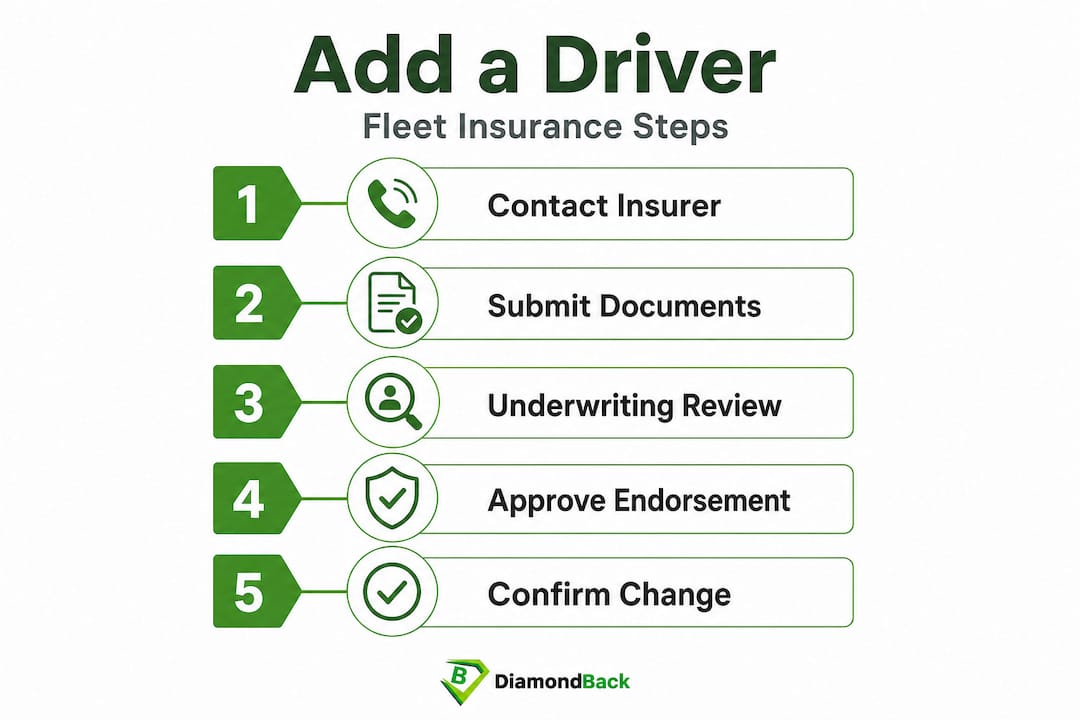
With all your documentation organized, the actual process of adding a driver is more straightforward than most fleet managers expect. The key is following each step in sequence and confirming completion at every stage.
Step one: Contact your insurer or broker. Reach out to your commercial insurance provider and notify them that you are adding a new driver. Some carriers have an online portal for driver additions; others require a phone call or email with attached documents. Either way, initiate the request as soon as the driver is hired, ideally before they ever sit in the cab.
Step two: Submit the required documents. Forward the CDL copy, certified MVR, PSP report, and completed employment application to your insurer. Be sure to include the driver’s start date and the vehicle or vehicles they will be operating. If your policy is a scheduled auto policy, you may also need to specify which units the driver is assigned to.

Step three: Wait for underwriting review. Your insurer’s underwriting team reviews the driver’s risk profile and determines whether the addition changes your premium. This step typically takes a few hours for straightforward applications and up to two or three business days for drivers with complex histories. According to FMCSA insurance filing requirements, keeping insurance and filings active avoids authority issues with FMCSA, so do not let a pending underwriting review create a period of ambiguity about coverage status.
Step four: Review the policy endorsement. Once the insurer approves the addition, they will issue a policy endorsement or updated declarations page. Read it carefully. Confirm the driver’s name is spelled correctly, the correct CDL number is listed, and the effective date matches the driver’s first day of work. Errors at this stage are common and easy to miss.
Step five: Confirm the change in writing. Request a confirmation email or updated certificate of insurance that shows the driver is now covered. Store this documentation in both your digital records and your physical compliance file.
Understanding how truck insurance for new drivers is priced differently from experienced drivers helps you anticipate potential premium increases before they arrive. A driver with less than two years of commercial experience can increase a fleet’s premium by a meaningful percentage, and knowing this in advance lets you budget accordingly.
| Factor | Adding a driver | Removing a driver |
|---|---|---|
| Premium impact | Usually increases | May decrease |
| Processing time | Hours to 3 business days | Usually same day |
| Documentation required | CDL, MVR, PSP, application | Written request |
| Retroactive changes | Rarely allowed | Sometimes allowed |
| Compliance risk | High if delayed | Low if prompt |
Adding and removing drivers are not mirror processes. Removal is typically faster and requires less documentation, but you should still confirm the change in writing to avoid any ambiguity about active coverage periods. For a thorough breakdown of what your policy covers during these changes, trucking insurance explained gives you the full picture.
Pro Tip: Set a calendar reminder for 30 days after adding a driver to review your updated policy documents and confirm that the premium adjustment matches what the insurer quoted. Billing errors after driver additions are surprisingly frequent.
Common mistakes and troubleshooting
Even experienced fleet managers run into problems when updating driver rosters. Most mistakes fall into a handful of predictable categories, and knowing them in advance puts you in a much stronger position.
Waiting too long to notify your insurer is the most common and costly mistake. Some managers assume they have a grace period of a few days after a driver starts. Most commercial policies do not work this way. If a driver is involved in an accident before being officially added, the claim can be denied entirely because that driver was not a listed operator at the time of the incident. The financial exposure from a single uninsured trucking accident can reach hundreds of thousands of dollars.
Submitting incomplete documentation creates underwriting delays that leave your coverage status uncertain. If the insurer cannot complete the review because a document is missing or illegible, the driver’s addition is placed on hold. You should check in with your insurer within 24 hours of submitting documents to confirm everything was received and is readable.
Overlooking endorsement errors on the updated policy is another serious issue. A transposed digit in a CDL number or a wrong effective date can create coverage disputes if a claim arises. Always verify the details on the endorsement before filing it away.
“Adding drivers should be coordinated with your overall compliance posture to avoid authority issues,” as outlined in FMCSA insurance filing requirements. Treating driver additions as isolated administrative tasks, rather than as part of your broader compliance program, is where many carriers get into trouble.
Driver eligibility issues catch many fleet owners off guard. If a driver’s MVR reveals a disqualifying violation, your insurer may decline to cover that individual. Common disqualifiers include DUI convictions within the past five to seven years, multiple at-fault accidents, or a suspended license period. When this happens, you have options: you can search for a specialty carrier that covers higher-risk drivers, or you can revisit the hire.
Familiarizing yourself with the most frequent insurance mistakes to avoid when managing fleet coverage gives you a practical framework for auditing your current processes. Strong risk management tips can reduce the frequency of these issues significantly over time. And if the process feels overwhelming, working with experienced insurance brokers for fleets can make driver additions faster and less error-prone.
Unreported mid-policy changes are another issue that surfaces at renewal. If you added drivers throughout the year but never formally updated your policy, you may face a significant retroactive premium adjustment when the insurer audits your roster at renewal time. Keeping your driver list current throughout the year prevents surprise billing.
Verifying coverage and ongoing compliance
Adding a driver is not complete until you have confirmed the update in your policy documents and verified that your FMCSA filings are consistent with your active coverage.
Start by reviewing your updated declarations page or policy endorsement and confirming the driver appears as a listed operator with the correct effective date. If your policy uses a scheduled driver list rather than an open driver policy, the driver must be explicitly named. An open driver policy covers any qualified driver operating your vehicle, but even under these policies, you should maintain an internal roster that matches what your insurer has on file.
From a regulatory standpoint, FMCSA compliance monitoring is an ongoing responsibility. FMCSA insurance filing requirements are clear that FMCSA-required filings must remain active even when you are updating driver information, meaning your Form MCS-90 or BMC-91 filings must reflect your current and active coverage without any gaps.
Building a regular audit habit into your operations calendar is one of the most protective steps you can take. A quarterly review of your driver roster against your current policy schedule takes less than an hour and catches errors before they become compliance violations. Check that every active driver appears on your policy, that no terminated drivers remain listed as active operators, and that all license and certification expiration dates are current.
Keeping your documentation organized also pays dividends during DOT audits. A clean, organized compliance file that includes driver applications, MVR reports, PSP reports, and insurance endorsements demonstrates that your operation takes regulatory compliance seriously. It also speeds up your insurer’s process the next time you need to add or update a driver.
Understanding how much insurance your trucking company needs as your fleet grows is part of this ongoing compliance picture. Adding drivers often means adding vehicles and expanding operations, and your coverage limits should scale accordingly.
A smarter approach to driver insurance management
Most guides treat driver additions as a simple administrative checkbox. We see it differently. Every time you add a driver to your policy, you have a genuine opportunity to strengthen your entire risk management program, not just update a form.
Think about the timing. You are already reviewing the driver’s MVR, PSP report, and employment history as part of the insurance process. That is exactly the same information you need to conduct a meaningful safety onboarding conversation. The insurance update and the safety touchpoint can happen simultaneously, reinforcing your fleet’s safety culture from day one.
There is also a direct financial argument for treating driver management as a strategic priority. Carriers that maintain clean driver rosters with documented safety training consistently secure better renewal rates than those that treat compliance as reactive paperwork. Insurers reward fleets that demonstrate proactive management, and the savings over a multi-year period can be substantial.
We also believe that the administrative friction of updating driver insurance is a symptom of a broader problem: most fleet owners are still working with outdated, manual processes that were designed for a different era. Using a platform that gives you instant access to multiple carriers and streamlined policy management changes the equation entirely. The time you save on paperwork is time you can invest in training, operations, and growth. Investing in cutting fleet costs through better risk management is one of the highest-return decisions a fleet owner can make.
The uncomfortable truth is that most compliance failures are not caused by ignorance of the rules. They are caused by process gaps and delays that accumulate over time. Building a disciplined, documented driver management process eliminates those gaps before they create real problems.
Protect your fleet with expert help
Managing driver additions, maintaining FMCSA compliance, and keeping your coverage optimized across a growing fleet is a lot to stay on top of. You should not have to navigate it alone.

Diamondback Insurance makes it straightforward to review your trucking insurance resources, compare quotes from multiple top carriers, and secure the right coverage for every driver on your roster. Whether you are adding your first driver or managing a large fleet, you can explore the insurance company directory to find the right carrier for your operation. If you operate in the Southeast, our commercial trucking coverage options are tailored to the specific regulatory environment you work in. Get your instant quote today and keep your fleet protected at every stage of growth.
Frequently asked questions
How long does it take to add a driver to a commercial insurance policy?
Most carriers can process driver additions within hours if all documents are ready, but delays occur when filings or compliance documents are missing or incomplete.
What documents do I need to add a driver to my trucking insurance?
You will need the driver’s CDL, certified motor vehicle record, FMCSA PSP report, and a completed employment application to submit to your insurer, since required filings and compliance with FMCSA must remain active throughout the process.
Can adding drivers affect my fleet’s insurance rates?
Yes, adding drivers with limited experience or adverse driving records can raise your premium because active filings and compliance data factor into how insurers calculate your fleet’s overall risk profile.
What happens if a driver is not properly added to my policy?
Your fleet could face coverage gaps, denied claims, or a lapse in FMCSA operating authority because driver additions must align with your overall compliance posture to avoid authority issues.
How can I check if my fleet is in compliance after updating insurance?
Review your updated policy endorsement and confirm your active FMCSA filings through your insurer’s portal, keeping in mind that FMCSA-required filings must remain active even when you are updating driver information.